
Need help getting your website ranked?
Contact Esabi today to request a FREE SEO analysis!

I’ve lost count of the number of times I’ve seen a beautifully redesigned website launch, only for its traffic to tank within days.
Sadly, it happens far more times than I’d care to mention, and almost always for the same reason – lack of planning!
Put simply, SEO wasn’t baked into the redesign process from the very start.
The agency (or designer) dropped the ball, big time!
A website redesign must integrate SEO from day one, because ignoring it leads to lost rankings, broken URLs, slower performance, and a significant drop in organic traffic – all totally avoidable.
That simple principle sits at the heart of every successful rebuild I have ever managed, and it’s exactly why this topic matters.
Redesigns should improve your visibility and performance – not wipe out years of growth.
Yet the harsh reality is this – redesigns done without SEO at its core almost always end up in a worse place.
So… before you or your web agency touch a single line of code, these are the ten SEO mistakes you absolutely cannot afford to ignore.
Table of Contents
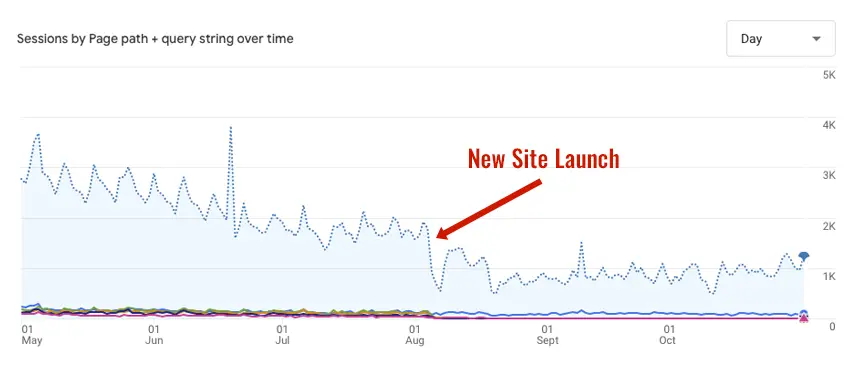
Whenever I talk about website redesign SEO, it comes from lived experience – not theory.
With more than 25 years in this business, I see the same mistakes made time after time.
I’ve had meetings with distraught business owners watch their traffic fall by 75% after a “premium” agency rebuild.
I’ve helped e-commerce clients recover their lost visibility after some other bright spark decided to “tidy up” their product URLs.
I’ve rebuilt redirect maps consisting of thousands of pages that should never have been broken in the first place.
I once worked with a client whose agency launched a new look website without migrating any of the previous page URLs, leading to over 18,000 “404” errors in Google Search Console!
They foolishly believed starting with a “blank slate” would help with performance and layout.
Within weeks, their rankings fell off a cliff, sales plummeted, and it took months to repair the damage caused.
Not because their new website was bad – it actually looked great.
But because no one carried the SEO equity across.
Those experiences are the reason I always warn clients that a redesign is not a simple visual exercise.
It’s structural. It affects every page, every URL, every internal link, every asset, and every signal search engines depend on.
Treat it carelessly, and you may never recover.
The best way to view a website rebuild is this – you’re effectively dismantling your house and putting it back together again.
If you misplace just one important brick, the structure is weakened.
The same applies to SEO.
If you change URLs, remove content, or slow the site down, Google WILL react and quickly.
The largest risks include:
These problems are common, avoidable, and often time-consuming and expensive to fix.
Which is why, in my experience, SEO should steer the direction of a redesign, not chase after it once decisions have already been made.

SEO is not a garnish you sprinkle on a website after launch.
It’s fundamental to how a site is structured, built, and understood by both users and search engines.
If you bring SEO in at the end, you are already too late.
SEO influences:
I’ve seen redesigns where the SEO strategy only began once the designers had finalised the layout.
By then, vital decisions had already been locked in, making SEO more expensive, more reactive, and far less effective.
SEO should be part of the project from the planning stage, because you simply cannot “polish” a turd site after launch and expect the damage to disappear.
Below are the ten core areas I prioritise in every website rebuild.
Ignore any of these and the consequences can be disastrous.

One of the biggest misconceptions I see is that historic keyword research is “still fine” for a redesign. It rarely is.
Search behaviour evolves, competitors change, and new opportunities emerge.
Every redesign project should start with current keyword research so the new structure reflects what your audience genuinely searches for today.
I always compare existing rankings with new keyword data.
This helps me spot gaps, identify pages that deserve more prominence, and plan new content that supports both users and search engines.
It also ensures that designers build templates capable of supporting future growth.
Some businesses feel compelled to change everything during a redesign: URLs, page titles, headings, navigation labels – even content that was already performing well.
That’s a dangerous instinct.
If a page ranks strongly, has backlinks, and brings organic traffic, stripping it back to rewrite it “from scratch” is like resetting a counter to zero.
I’ve seen companies lose their most valuable pages simply because someone felt the copy sounded “dated”.
If something works, protect it.
If it’s genuinely outdated, improve it to make it evergreen – but don’t wipe the slate clean.
A redesign should enhance your success, not erase it.
If I could choose only one task during a redesign, this would be it.
Incorrect or missing 301 redirects are the number one cause of ranking drops during a site rebuild.
A redirect map must be created before launch – not after the site goes live.
I’ve worked with too many clients whose previous agencies pushed redirect work to the end of the project, only to rush it or forget it altogether.
A single 404 error might not destroy everything, but dozens of them absolutely will.
They cause lost equity, crawl errors, and significant ranking instability.
Redirects protect every ounce of past authority you have earned.
Deleting old pages because they “look outdated” is another major mistake I see repeatedly.
If the content has good rankings, good backlinks, or good engagement, it should be preserved.
Whenever I rebuild a site, I always start by auditing existing content:
Once I know that, I decide whether to improve, expand, merge, or simply retain them.
A redesign should refresh content, not wipe the slate clean.

A redesign often introduces new templates, new heading styles, new image placements, and new ways of structuring content.
If these templates do not support clear, accessible on-page optimisation, your rankings will struggle.
I always ensure the following remain intact:
Design and SEO are not enemies.
But design without SEO can quietly destroy organic performance.
Image formats may not sound exciting, but they are one of the most impactful technical SEO decisions you can make.
Switching from JPEG and PNG to modern formats such as WebP and AVIF dramatically reduces file sizes while keeping image quality high.
During redesigns, I always insist clients adopt these formats because:
Modern design often relies on beautiful images and large banners.
Without modern formats, these visuals slow the site down from day one.
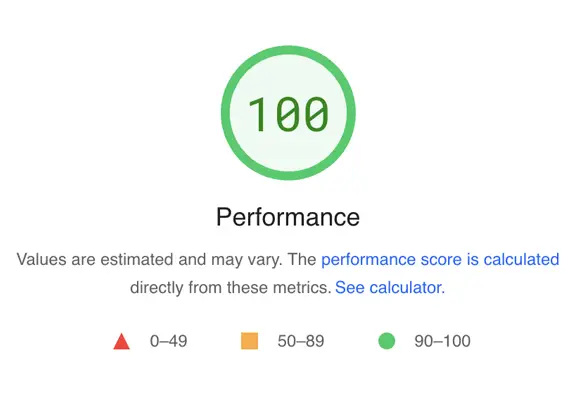
If there’s ever a perfect time to fix performance issues, it’s during a redesign.
Speed is not something you want to patch afterwards.
From my experience, the biggest speed killers during redesigns are:
I always advise clients to test speed throughout the build rather than waiting until launch week.
Optimising early allows developers to adjust templates and code efficiently, rather than scrambling to fix structural issues at the end.
Internal links are the bloodline of a website.
They tell Google how your content is connected, how authority flows, and which pages are most important.
A redesign often changes navigation labels, URLs, and page groupings.
If you don’t rebuild your internal links intelligently, your most important pages may lose visibility.
I always audit internal linking before and after launch to ensure:
Internal linking takes time, but its impact on rankings is substantial.

Once a new site goes live, I always update and resubmit the XML sitemap to ensure Google receives a clean index of all new and updated URLs.
This sounds simple, but I have seen agencies overlook thai critical stage entirely, leaving Google to crawl outdated pages or broken URLs.
A freshly generated sitemap helps Google understand the new structure and accelerates the indexing of any new content.
This is the newest, and arguably most important consideration in modern redesigns.
Search is no longer just about blue links and rankings.
With the rise of LLM’s like Google’s AI Overviews, ChatGPT, Perplexity, and Microsoft Copilot, your content needs to be written in a way that AI can interpret easily.
When I prepare content for a redesign, I ensure:
A redesign offers the perfect opportunity to bring content up to modern AI standards.
By doing so, you can significantly improve visibility in emerging search formats.
I have seen enough redesigns go wrong to know that SEO cannot be an optional extra.
When overlooked, it causes traffic loss, ranking instability, and frustrated business owners who can’t understand why their shiny new website performs worse than its predecessor.
But when SEO is woven into the redesign from the beginning, the results can be transformative.
You preserve your hard-earned equity, strengthen your technical foundations, and build a future-proof site that performs in traditional search and AI-driven results alike.
A redesign should never erase your history. It should amplify it.